
Waiting for a wedding, a trip, or just the weekend hits differently when the exact number of days is sitting right on your home screen. We compared our top 4 picks for Android countdown widget apps — here’s how they stack up, starting with our own.
Got a date worth counting down to?
Try Countdown Days by MaslonLabs →What to Look for in a Countdown Widget App
- A widget that’s actually the point — not a single plain size bolted on as an afterthought to a bigger app.
- Multiple events at once — a birthday, a trip, and a deadline shouldn’t fight for the same widget.
- Reminders beyond the widget itself — a notification the day before matters as much as the number on your home screen.
- Reasonable free tier — enough events and widgets to actually use before hitting a paywall.
- Reliable daily refresh — a countdown that gets stuck on the wrong number defeats the purpose.
1. Countdown Days & Notification by MaslonLabs — Best Overall
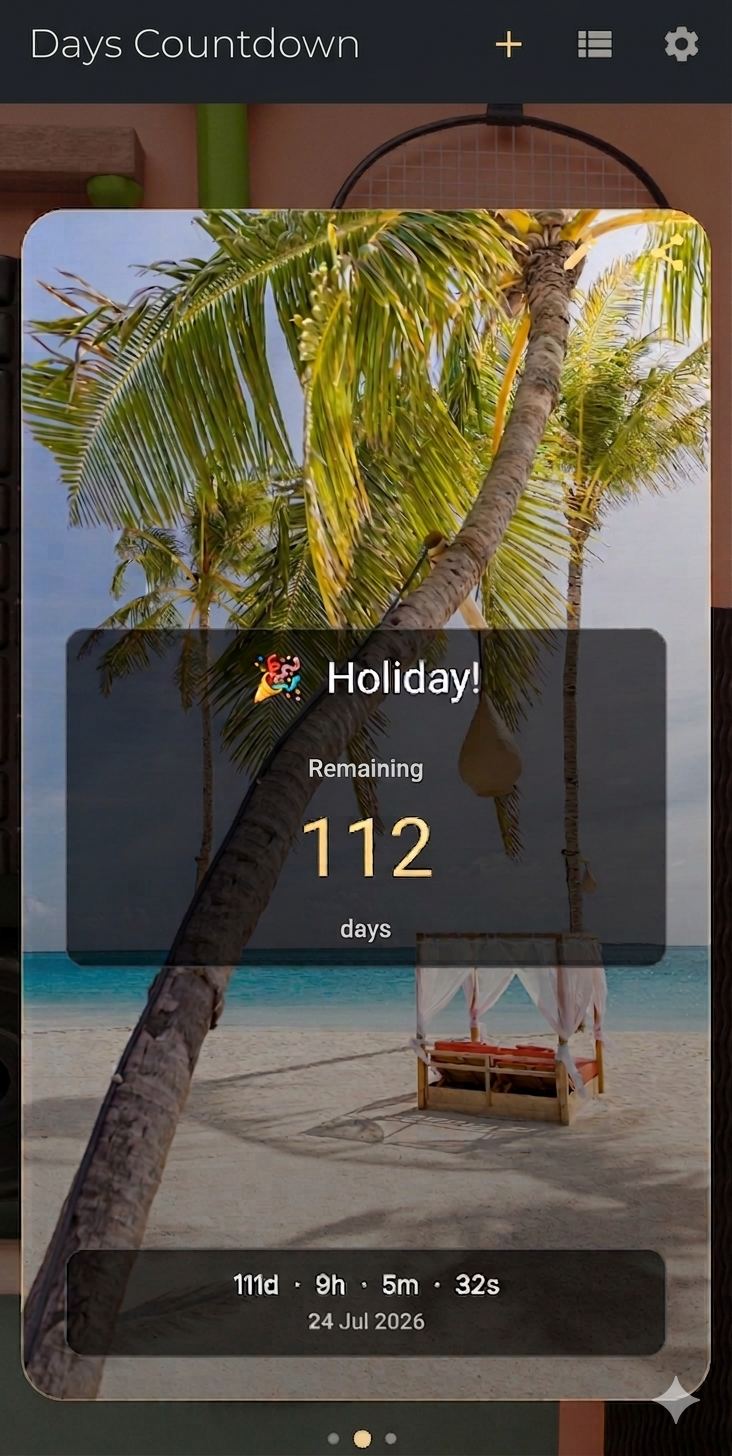
Countdown Days & Notification, created by MaslonLabs studio, is our top pick — built specifically because most countdown apps treat the widget as secondary. It offers 3 widget sizes, beautiful countdown cards with emoji and custom photo backgrounds, and custom reminders (daily, weekly, monthly, or a set number of days before the event).
The free tier includes up to 4 active events with widgets and 2 reminders each — enough to actually use before you hit a wall. Premium unlocks unlimited events, up to 10 reminders per event, and recurring yearly events for birthdays and anniversaries.
Full breakdown on our Countdown Days app page, or get it directly on Google Play.
2. DaysCounter: Countdown Widget by SHBT
DaysCounter is made by SHBT, and its standout feature is a net working days filter — it can automatically exclude weekends, public holidays, and school breaks, which is genuinely useful if what you’re counting down is a work deadline rather than a birthday. It’s ad-free with every core feature included at no cost.
Worth a look specifically if working-days accuracy matters more than a birthday countdown: Google Play.
3. Day Counter: Countdown Timer by BITSENS
Day Counter, by BITSENS, is the most established name on this list — over 100,000 downloads and a 4.1-star rating. It covers both directions: counting down to a future date and counting up from a past one, which makes it equally useful as an anniversary or relationship counter as it is a countdown.
It uses a one-time purchase to unlock unlimited events and larger widgets rather than a subscription. A solid alternative if you specifically want a count-up mode alongside the countdown: Google Play.
4. Countdown Days with Widgets by ByteHug Technologies
Countdown Days with Widgets, by ByteHug Technologies, leans into built-in categories for holidays and celebrations — Christmas, New Year, Diwali, Ramadan, Hanukkah, and more are ready to go without setting them up manually.
A reasonable alternative if you want a wide range of pre-built holiday counters rather than adding every event by hand: Google Play.
Which One Should You Actually Download?
If you want a countdown widget that’s genuinely built around the widget itself — multiple sizes, custom photo backgrounds, and real reminder options — start with Countdown Days & Notification by MaslonLabs. If your countdown is specifically a work deadline, DaysCounter’s working-days filter is worth a look. The other two alternatives above are solid choices too, just narrower in what they offer.
Ready to see the days count down?
Get Countdown Days by MaslonLabs →Frequently Asked Questions
Which is the best countdown widget app for Android?
Countdown Days & Notification by MaslonLabs is our top pick for a widget-first app with multiple sizes, custom photo backgrounds, and flexible reminders.
Can I have more than one countdown widget on my home screen?
Yes — every app on this list supports multiple separate widget instances, each tracking a different event.
Do countdown widgets work on both Samsung and Pixel phones?
Yes. The widget itself works the same way everywhere; only the menu you use to add it to your home screen looks slightly different between Samsung’s One UI and Pixel’s stock Android picker.
Do countdown widget apps drain battery?
A well-built countdown widget uses minimal battery since it only needs to refresh once a day, not continuously.
Are these countdown widget apps free?
Yes, all four apps in this list are free to download, with optional premium upgrades or in-app purchases.
Can I set reminders in addition to the widget itself?
Yes — most apps in this list, including Countdown Days, let you set notification reminders (daily, weekly, or a set number of days before the event) on top of the home screen widget.
Whichever you pick, the appeal is the same one printed paper countdown chains always had — just automatic now, and impossible to lose.