
The best level app for Android in 2026 is Bubble Level: Spirit Level Tool by MaslonLabs, a simple phone level with a surface mode, an edge mode, audio feedback and calibration. If you want angle, tilt and gradient tools in the same app, Gamma Play’s Bubble Level is the established all-in-one option, and Bubble Level Galaxy adds a ruler and flashlight.
Every phone already has the sensors needed to check whether a shelf, picture frame or table is level, no separate tool required. We compared four bubble level apps for Android using their Google Play listings (checked on October 7, 2026): rating, downloads, ads and what each app actually does. Bubble Level: Spirit Level Tool is created by MaslonLabs, the publisher of this site.
Best Level Apps for Android at a Glance
| App | Best for | Google Play rating | Downloads | Ads / purchases |
|---|---|---|---|---|
| Bubble Level: Spirit Level Tool (by MaslonLabs) Get it on Google Play | Best overall: simple, fast level with surface and edge modes | No rating yet | New release | Ads and in-app purchases |
| Bubble Level (Gamma Play) | All-in-one measuring tools | 4.7 (335K reviews) | 10M+ | Ads |
| Bubble Level Galaxy (Szymon Dyja) | Level plus ruler and flashlight | 4.7 (96K reviews) | 5M+ | Ads |
| Bubble Level – Spirit Level (IDAFN Technology) | No-frills basic level | No rating yet | 1K+ | Ads |
Ratings, downloads and pricing come from each app’s Google Play page on October 7, 2026 and change over time.
Need a level right now?
Try Bubble Level by MaslonLabs →What to Look for in a Level App for Android
- Real accuracy and calibration. The ability to set your own zero point matters more than any extra feature, since phone cases and uneven screens throw off raw sensor readings.
- More than one mode. A flat “surface” level for tables and floors is not the same job as an “edge” level for checking a wall or a hanging frame.
- A display you can read at a glance. You are usually holding something in one hand while checking the level with the other, so clutter costs you time.
- Ads that do not block the reading itself. A full-screen ad mid-task defeats the purpose of a quick tool.
1. Bubble Level: Spirit Level Tool by MaslonLabs — Best Overall
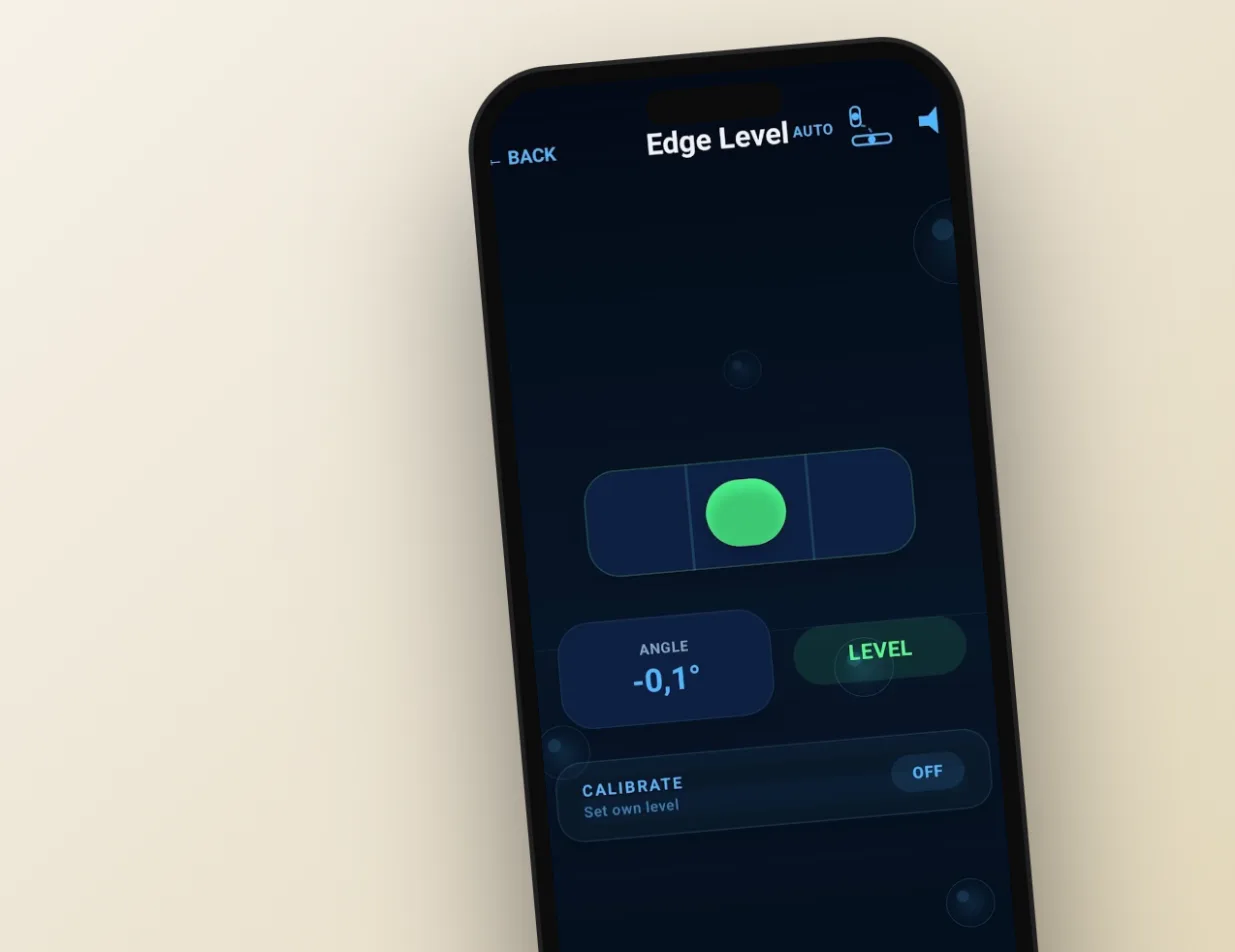
Bubble Level: Spirit Level Tool is created by MaslonLabs, and we rank it first because it keeps to the one job a level app has to do. Most alternatives bury a simple tool under angle finders, rulers and other features nobody opens a level app to use. This one has two clear modes: Surface Mode, a 2D bubble level for tables, counters and floors, and Edge Mode, a 1D level for walls, frames and vertical surfaces, with both landscape and portrait support in Edge Mode.
- Calibration: set your own zero point to compensate for a phone case or a slightly uneven surface.
- Audio feedback: the tone changes as you approach level, so you do not need to stare at the screen while adjusting something with both hands. It is the only app in this list whose Google Play description mentions it.
- Watch out for: it contains ads and in-app purchases, and it is a new app without public ratings yet.
Full breakdown on our Bubble Level app page, or get it directly on Google Play. New to using a phone as a level? Read how to use your phone as a level.
2. Bubble Level by Gamma Play — Best for All-in-One Measuring Tools
Bubble Level by Gamma Play is the heavyweight on this list: 10M+ downloads and a 4.7 rating from about 335,000 reviews. Its Google Play description lists a bubble level and a bull’s-eye level, calibration with set and reset, and also an inclinometer, angle finder, tilt meter, gradient meter and a ruler, aimed at carpentry and construction as much as quick home fixes.
- Best for: people who want every measurement tool bundled into one app.
- Watch out for: it contains ads, and its Play listing was last updated in August 2025. Some reviewers complain about ad frequency and about how the ad-free upgrade is offered.
Bubble Level by Gamma Play on Google Play.
3. Bubble Level Galaxy by Szymon Dyja — Best for Ruler and Flashlight Extras
Bubble Level Galaxy, built by independent developer Szymon Dyja, keeps things simple and adds two small utilities: a ruler for quick measurements and an LED flashlight for dim spaces. It has 5M+ downloads and a 4.7 rating from about 96,000 reviews, and its listing was updated on September 29, 2026.
- Best for: a straightforward level with a couple of conveniences.
- Watch out for: it contains ads.
Bubble Level Galaxy on Google Play.
4. Bubble Level – Spirit Level by IDAFN Technology — Best Basic Alternative
Bubble Level – Spirit Level by IDAFN Technology covers the basics: a digital bubble level, spirit level, angle finder and surface incline analysis. It is a much smaller listing than the others (1K+ downloads and no public rating yet), so it has less of a track record.
- Best for: a no-frills level as a backup.
- Watch out for: it contains ads.
Bubble Level – Spirit Level on Google Play.
Which Level App for Android Should You Download?
- You want a fast, simple level with surface and edge modes: Bubble Level: Spirit Level Tool by MaslonLabs.
- You want angle, tilt and gradient tools in the same app: Gamma Play’s Bubble Level.
- You want a ruler and flashlight too: Bubble Level Galaxy.
- You just need a basic backup: IDAFN Technology’s Bubble Level.
Ready to hang that shelf straight?
Get Bubble Level by MaslonLabs →Want to put a level app to work? Learn how to level a washing machine or fridge with your phone.
Planning a trip? Read how to level an RV or camper with your phone.
Hanging frames or shelves? Read how to hang pictures straight with your phone.
Got a pool table to set up? Read how to level a pool table with your phone.
Frequently Asked Questions
What is the best level app for Android?
Bubble Level: Spirit Level Tool by MaslonLabs is our top pick for a fast, uncluttered level with both surface and edge modes, audio feedback and calibration. For an all-in-one toolbox with angle, tilt and gradient meters, Gamma Play’s Bubble Level is the established alternative.
How accurate are phone bubble level apps?
Accuracy depends on your phone’s motion sensor, and calibration helps because it compensates for a case or an uneven screen. That is usually enough for hanging pictures, shelves and most home DIY tasks. For structural or professional-grade work, keep a physical level as backup.
Do I need to calibrate a bubble level app?
Ideally once after installing it. Place your phone on a surface you know is level, then set that as the zero point. This compensates for a phone case or a slightly uneven screen. Not sure how to read the result? See how to use your phone as a level.
Do bubble level apps work offline?
The leveling itself relies on your phone’s built-in sensors, so it does not need an internet connection. The ads in free apps do need one, so you may see fewer ads offline.
Are these bubble level apps free?
Yes, all four apps in this list are free to download. All four contain ads, and the MaslonLabs app also offers in-app purchases.
What is the difference between surface mode and edge mode?
Surface mode is a 2D level for flat things like tables, counters and floors. Edge mode is a 1D level for checking a vertical surface like a wall or a hanging picture frame. They measure differently, so a good app offers both.
None of these apps replace a real physical level for serious construction work, but for the vast majority of home tasks the phone in your pocket is already accurate enough.