
Turning a favorite photo into a jigsaw puzzle used to mean mailing it off to a specialty printer. Now it’s a phone app away. We compared our top 4 picks for Android — here’s how they stack up, starting with our own.
Got a photo worth turning into a puzzle?
Try Photo Puzzle Maker by MaslonLabs →What to Look for in a Photo Puzzle Maker App
- Real privacy — your photos should be processed on your device, not uploaded anywhere. Check the app’s data safety section before trusting it with family photos.
- Adjustable difficulty — a good app covers everything from a relaxing 6-piece puzzle for kids to a genuinely challenging 100+ piece version.
- More than one puzzle style — classic drag-and-drop jigsaw and sliding (15-puzzle style) reward different kinds of patience.
- Fully offline — turning a photo into a puzzle shouldn’t require an internet connection.
- Unlimited use of your own photos — not just a handful of stock images with your photo bolted on as an afterthought.
1. Photo Puzzle & Jigsaw Maker by MaslonLabs — Best Overall
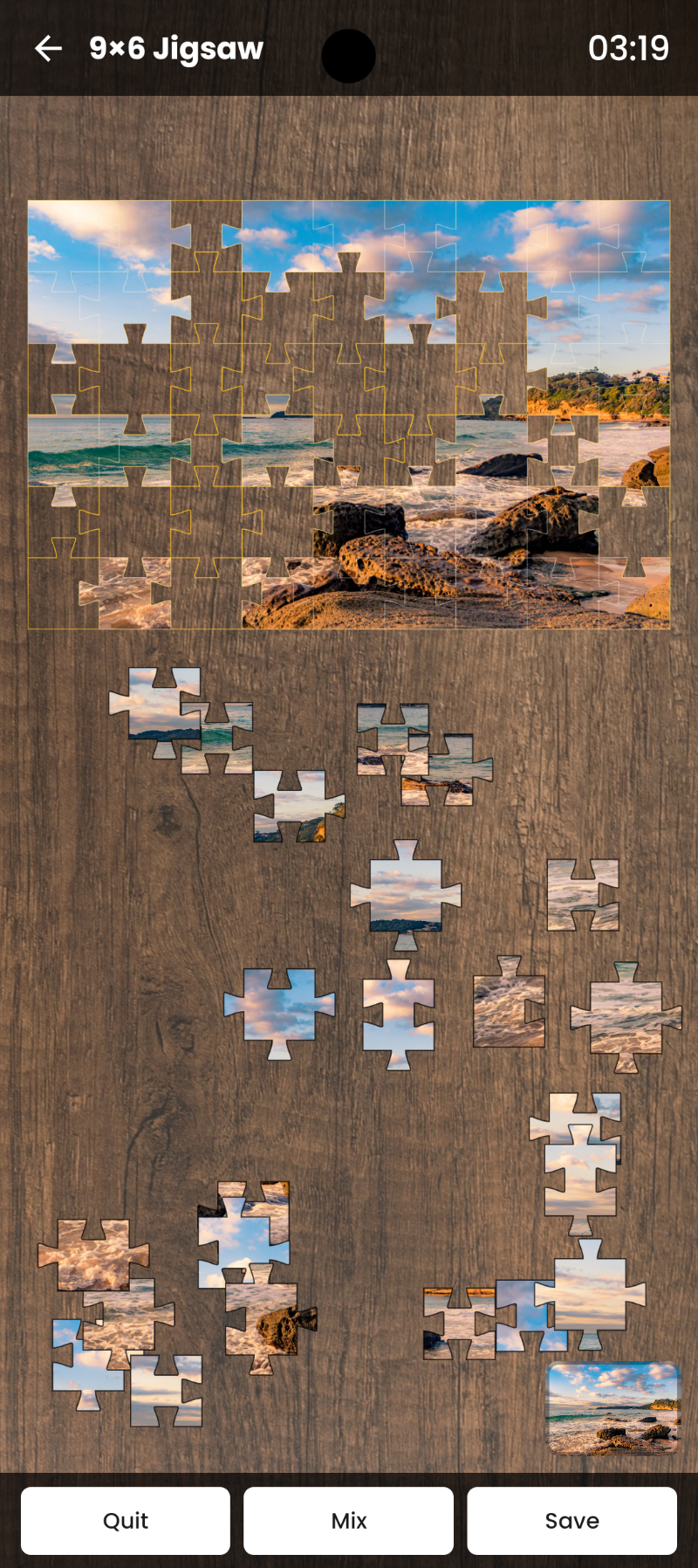
Photo Puzzle & Jigsaw Maker, created by MaslonLabs studio, is our top pick — and privacy was the reason we built it in the first place. Every puzzle is generated locally on your device; your photos are never uploaded to a server or shared with anyone. You get real range on difficulty too: 6 up to 100 pieces across nine preset levels, so it works for a quick game with a kid or a genuinely tough evening puzzle.
It supports both classic Jigsaw (drag & drop) and Sliding Puzzle mode, tracks your best completion times, and works with any photo from your gallery or camera — no limits, no premade image packs required. Fully offline, clean interface, nothing else competing for attention.
Full breakdown on our Photo Puzzle Maker app page, or get it directly on Google Play.
2. Photo Puzzle – Jigsaw Maker by AgentCodeApps
Photo Puzzle – Jigsaw Maker is made by AgentCodeApps. It covers the same core idea — turn any gallery photo into a jigsaw — and adds a genuine extra: Pass & Play mode, where two people solve the same puzzle on one device and the faster time wins. A nice option if you want a puzzle you can actually compete over.
Solo Mode covers the relaxed, one-player side with adjustable difficulty. Worth a look specifically for the local head-to-head format: Google Play.
3. My Photo Jigsaw: Custom Puzzles by SamAndroidDev
My Photo Jigsaw pairs the your-own-photo feature with a large built-in library — 340+ HD images across 11 categories, plus a free daily puzzle to build a streak. Difficulty scales further than most, up to a 400-piece “Legend” board, and it adds extras like a rotation mode, edge-piece sorting, and save-and-resume.
It leans more toward a full puzzle-game experience than a focused photo tool, which is either a bonus or more than you need depending on what you’re after. A reasonable alternative if you want premade puzzles alongside your own photos: Google Play.
4. My Picture Puzzle by Bruno Sousa
My Picture Puzzle is the most established name on this list by install count — over 100,000 downloads. It keeps things simple: puzzles from your own photos or a set of built-in landscape images, up to 100 pieces, on phone or tablet.
It’s a straightforward, no-frills choice if you just want the core photo-to-puzzle feature without extra modes: Google Play.
Which One Should You Actually Download?
If privacy and a genuinely wide difficulty range matter most, start with Photo Puzzle & Jigsaw Maker by MaslonLabs. If you specifically want a local head-to-head Pass & Play mode, AgentCodeApps’ version is worth grabbing as well. The other two alternatives above are solid choices too, just narrower in what they offer.
Ready to turn a memory into a puzzle?
Get Photo Puzzle Maker by MaslonLabs →Frequently Asked Questions
Is it safe to use family photos in a photo puzzle app?
Check the app’s Data Safety section on its Play Store listing first. Photo Puzzle Maker by MaslonLabs processes every photo locally on your device and never uploads it anywhere.
Which is the best photo puzzle maker app for Android?
Photo Puzzle & Jigsaw Maker by MaslonLabs is our top pick for combining real privacy with a wide difficulty range, from 6 up to 100 pieces.
Can I make a puzzle from any photo, or only certain ones?
The apps in this list all let you use any photo from your gallery or camera, with no limit on how many puzzles you create.
Do these photo puzzle apps work offline?
Yes — every app on this list generates and lets you solve puzzles fully offline once installed.
Are these photo puzzle apps free?
Yes, all four apps in this list are free to download, with ads and optional in-app purchases or premium upgrades.
What’s the difference between Jigsaw mode and Sliding Puzzle mode?
Jigsaw mode is the classic drag-and-drop style with interlocking pieces. Sliding Puzzle mode is the 15-puzzle style, where pieces slide into a single empty slot — a different, more constrained kind of challenge.
Whichever you pick, the appeal is the same one paper jigsaw puzzles always had — just faster to make, and with an unlimited supply of photos to choose from.