A wedding is a date you have been waiting for, and a countdown makes the wait part of the fun. A widget puts the days left on your Android home screen, so you see them every time you unlock your phone. Here is how to set one up in a couple of minutes.
Quick Answer
To count down to your wedding on Android, install a countdown widget app such as Countdown Days Widget by MaslonLabs, add an event named Wedding with the date and time, pick a wedding background and place the widget on your home screen. With the app the card also shows the exact days, hours, minutes and seconds left.
How to Add a Wedding Countdown Widget on Android
These steps use Countdown Days Widget by MaslonLabs, the publisher of this site. See the app page for every feature.
- Install Countdown Days Widget from Google Play and open it.
- Tap + on the main screen.
- Type Wedding as the name and choose an emoji, for example the bride.
- Set the event date and time, for example the hour of the ceremony.
- Keep Enable notifications on and add the reminders you want, such as a month and a week before.
- Under Background open Images and pick Wedding, choose the card layout and tap Create Event.
- Long-press an empty spot on your home screen, tap Widgets, find Countdown Days Widget and drag it onto the screen. Choose your wedding event.
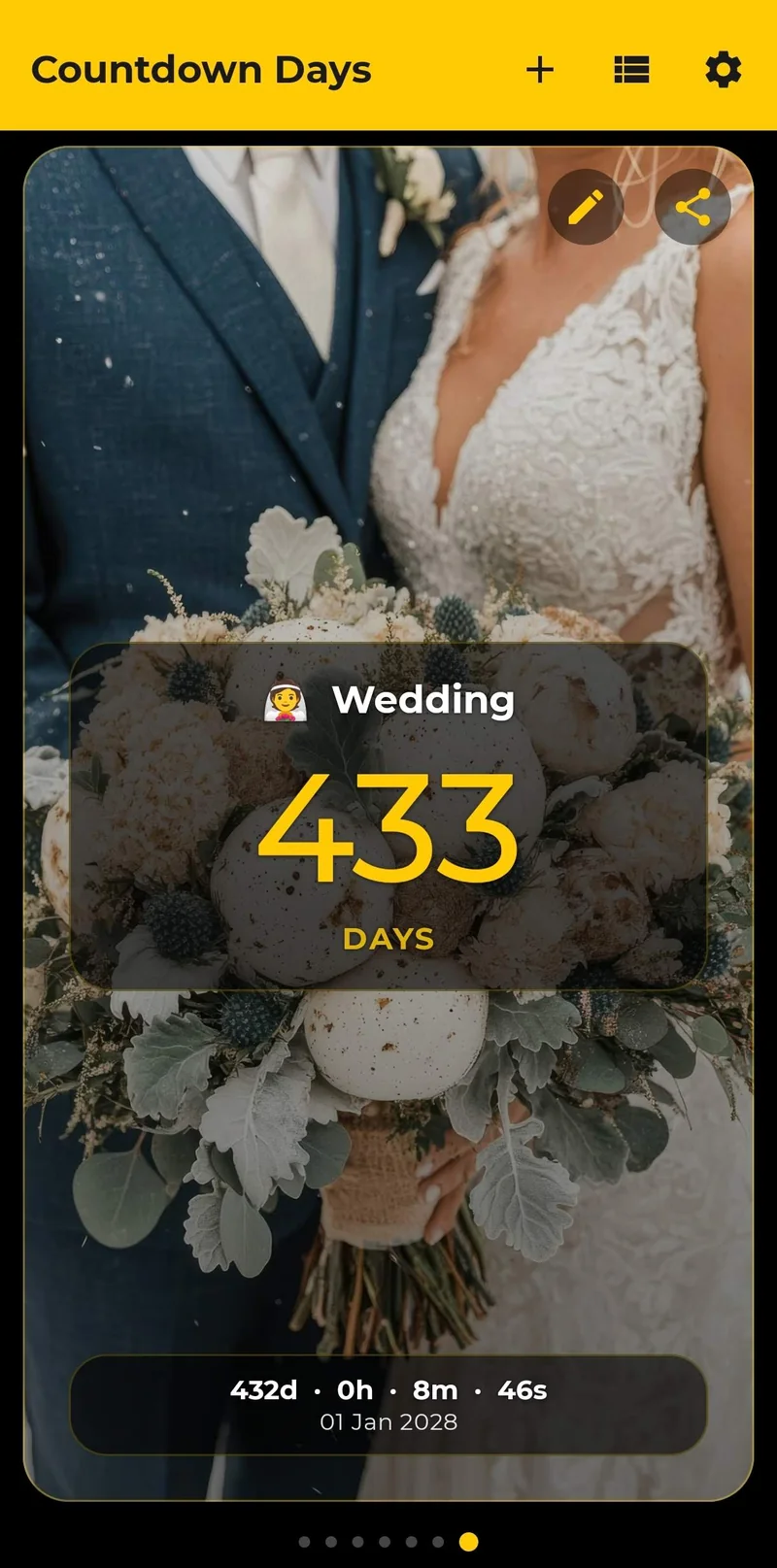
What Your Wedding Card Shows
The card shows the days left in large type, the exact time below it in days, hours, minutes and seconds, and the date of the wedding, on top of the picture you chose. Tap the share button to send the card as a picture to your partner, your family or your guests.
Put the Countdown on Your Home Screen
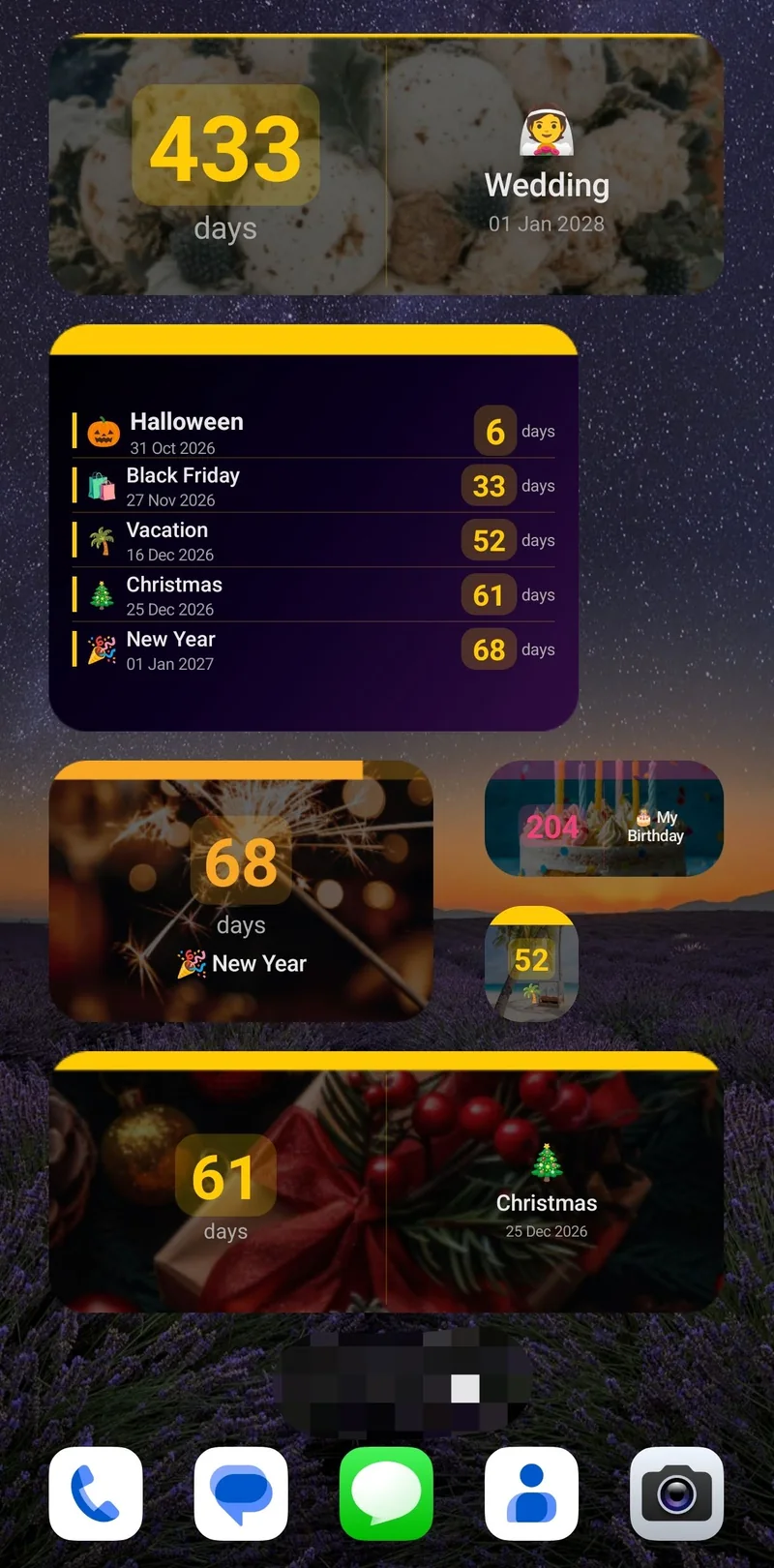
Choose one of five single-event widget sizes: tiny, small, narrow, medium or strip. A wide widget shows the days left next to the name and date of the wedding, as in the screenshot, and keeps the wedding photo as its background. The list widget (Premium) shows several events in one widget, for example the wedding, the honeymoon and the dress fitting.
Reminders Before the Big Day
A reminder helps with the things that come before the day: a month before to confirm the details, a week before for the final checks. Each event can send notifications daily, weekly, monthly or a set time before the date, each at an exact time, and you can edit the notification text. The free plan includes 2 reminders per event, and Premium adds more.
More Ideas for Your Countdown
- Count down to the honeymoon as a second event.
- Planning the trip? See how to set up a vacation countdown widget.
- Several dates to track? Read how to show multiple countdowns on your Android home screen.
For general widget steps on Samsung and Pixel phones, see our guide to adding a countdown widget to your Android home screen, and to compare apps, read the best countdown widget apps for Android.
Free vs. Premium for Your Wedding Countdown
| Free | Premium | |
|---|---|---|
| Events | Up to 4 | Unlimited |
| Home screen widgets | 1 | Unlimited |
| Reminders per event | 2 | More |
| Widget customization | Basic: dark or light, font size, what to show | Full: accent colours, progress bar, opacity, event photo background |
| Ads | Yes | No ads |
Premium comes as a monthly subscription (with a 7-day free trial for eligible new subscribers), a yearly subscription or a one-time lifetime purchase. A trial becomes a paid subscription unless you cancel in Google Play before it ends.
Start counting down to your wedding
See Countdown Days Widget →You can also go straight to Countdown Days Widget on Google Play.
Want the exact number of days to the wedding? Enter the date in our free days until date calculator and see the days, hours and minutes left.
Frequently Asked Questions
What is the best wedding countdown app for Android?
Look for an app that shows the exact time left, lets you choose a wedding background and has a home screen widget. Countdown Days Widget by MaslonLabs does all three, and the free plan includes 1 widget.
Is there a free wedding countdown widget for Android?
Yes. The free plan of Countdown Days Widget includes up to 4 events, 1 home screen widget and basic customization, with ads. Premium removes ads and the limits.
Can I count down to the exact time of the ceremony?
Yes. Each event has a date and a time, and the card shows the days left as well as days, hours, minutes and seconds.
Can I use our own photo as the background?
The app has a ready-made Wedding image, plus colours and gradients. With Premium you can also use your own photo as the card background.
Can I share the countdown?
Yes. You can share any event card as a picture, for example with your partner or your guests.
Can I count down to other wedding dates too?
Yes. Add the engagement party, the rehearsal or the honeymoon as separate events. Use one widget per event, or the list widget (Premium) that shows your 5 nearest events or the events you choose.
Can I get reminders before the wedding?
Yes. Each event can send reminders daily, weekly, monthly or a set time before the date, each at an exact time. The free plan includes 2 reminders per event.
Is there a free trial for Premium?
The monthly Premium plan has a 7-day free trial for eligible new subscribers. A trial becomes a paid subscription unless you cancel in Google Play before it ends.
Which Android versions are supported?
Countdown Days Widget requires Android 7.0 or newer.