
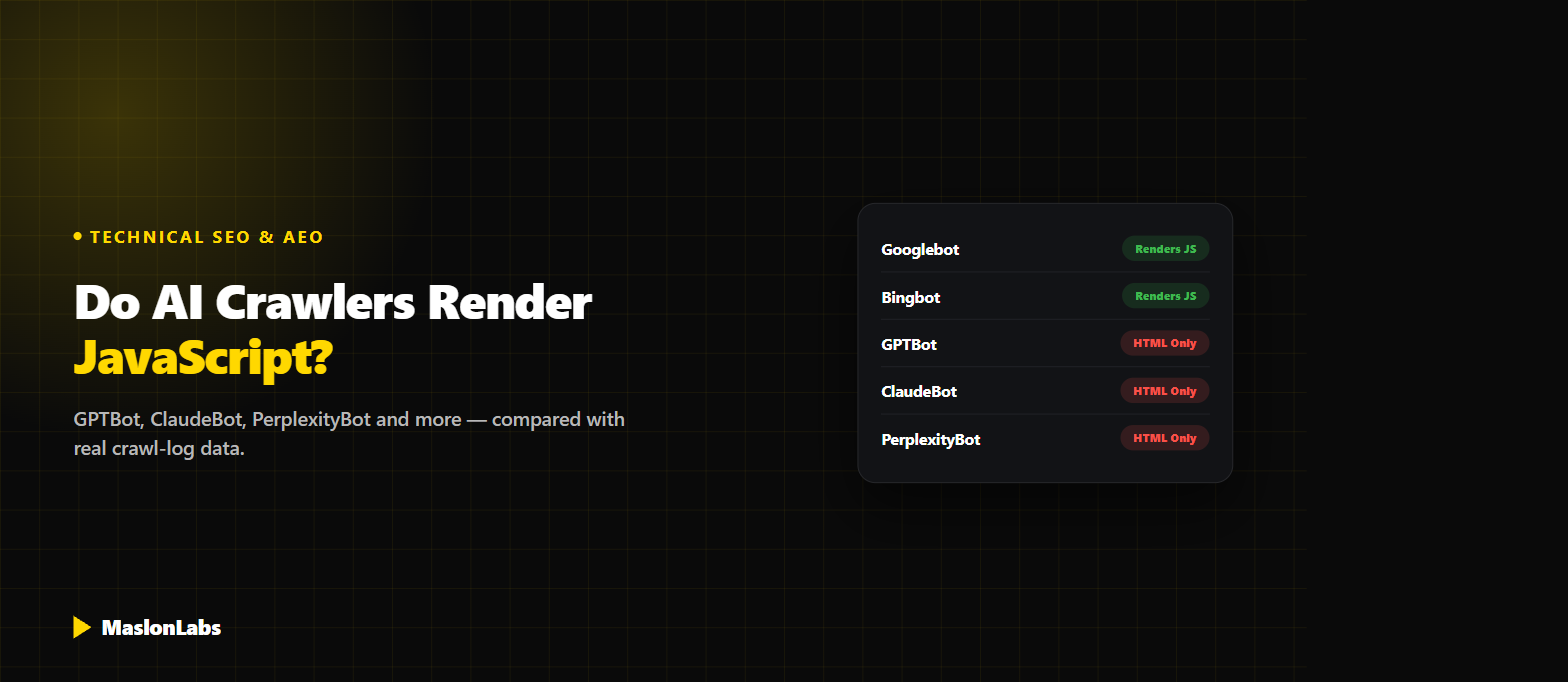
Most AI crawlers do not run your JavaScript. They request the page, read whatever HTML your server hands back in that first response, and move on — no clicking, no scrolling, no waiting for a script to fetch data and paint it onto the screen. If your content depends on client-side rendering to appear, a large share of AI bots never see it at all. There are exceptions, and the exceptions matter, so here’s exactly who renders what, backed by real crawl-log data rather than guesswork.
Not sure what AI crawlers actually see on your site?
Get a Free SEO & GEO Audit →How a Non-Rendering Crawler “Sees” Your Page
A browser does two passes: it downloads the initial HTML, then runs any JavaScript on the page, which can fetch more data and rewrite the DOM before anything meaningful is shown. A crawler that doesn’t execute JavaScript only ever gets the result of the first pass. If your page is server-rendered or static, that first pass already contains your real content, and nothing is lost. If your content is injected after the page loads — a common pattern in client-side-rendered React, Vue, or Angular apps — a non-rendering crawler sees an near-empty shell: a few script tags, a loading spinner, maybe a `<div id=”root”></div>`, and nothing else.
This isn’t a theoretical risk. Vercel’s analysis of over 500 million GPTBot requests across its network found zero evidence of JavaScript execution — GPTBot fetched `.js` files in about 11.5% of requests, but never ran them. The same study found ClaudeBot downloading JavaScript files in roughly 23.8% of requests, also without executing them.
Which AI Crawlers Render JavaScript (And Which Don’t)
| Crawler | Operator / Purpose | Executes JavaScript? |
|---|---|---|
| Googlebot | Google — search index & AI Overviews | Yes — full headless Chromium |
| Google-Extended | Google — Gemini training/grounding opt-out token | Yes — via Googlebot infrastructure |
| Bingbot | Microsoft — Bing Search & Copilot | Yes |
| Applebot | Apple — Siri, Spotlight, Safari search | Yes — browser-based rendering |
| Applebot-Extended | Apple — AI-training opt-out control | Rides on Applebot’s crawl, no independent JS execution confirmed |
| GPTBot | OpenAI — model training | No — confirmed on 500M+ requests |
| OAI-SearchBot | OpenAI — ChatGPT Search visibility | No |
| ChatGPT-User | OpenAI — live fetch when a user shares a link | No |
| ClaudeBot | Anthropic — crawling & training | No — reads raw HTML only |
| PerplexityBot | Perplexity — search answers | Mostly no — limited, unreliable partial support reported |
| CCBot | Common Crawl — open dataset feeding many AI labs | No |
| Bytespider | ByteDance — AI training | No |
| Meta-ExternalAgent | Meta — Llama training | No |
| Amazonbot | Amazon — Alexa & search | No / unreliable |
The pattern is simple: if a company already operated a full-text search engine with its own rendering pipeline — Google, Microsoft, Apple — its AI crawler inherits that infrastructure. Every AI-native crawler built from scratch in the last few years skips rendering entirely, almost certainly because executing JavaScript at crawl scale is expensive, and these bots work under tight timeouts, often just a few seconds per page.
Why OpenAI Alone Has Three Different Bots
A detail that trips a lot of people up: “ChatGPT” doesn’t crawl your site with one bot, it uses three, each with a different job and its own robots.txt rule:
- GPTBot — crawls content that may be used to train future models.
- OAI-SearchBot — crawls and indexes pages specifically so they can surface in ChatGPT Search results.
- ChatGPT-User — fetches a single page on the spot, triggered by a real user action, like pasting a URL into a chat.
None of the three execute JavaScript, but you can block them independently in robots.txt — disallowing GPTBot alone keeps your content out of OpenAI’s training data while leaving ChatGPT Search visibility untouched. Blocking OAI-SearchBot instead removes you from ChatGPT Search results specifically. If you want visibility in one and not the other, don’t assume one `User-agent: *` rule covers all of OpenAI’s traffic.
“
I see this break the same way on almost every client audit: a perfectly good page that renders beautifully in a browser and is functionally invisible to GPTBot, because the actual text only exists inside a JavaScript bundle. The fix is rarely “rewrite the frontend” — it’s usually “make sure the first HTML response already contains the content,” however you get there.
— Mateusz Maslon, SEO/GEO Specialist
LinkedIn ↗
CSR vs. SSR vs. SSG vs. Hybrid: What to Actually Use
If most AI crawlers only read the first HTML response, your rendering strategy stops being purely a performance decision and becomes a visibility one.
| Strategy | What a Non-Rendering Bot Sees | Verdict for AI Visibility |
|---|---|---|
| Client-Side Rendering (CSR) | An almost-empty HTML shell; the real content only exists after JS runs in a browser | Avoid for any page you want AI systems to read or cite |
| Server-Side Rendering (SSR) | Fully-rendered HTML on every request, generated on your server before it’s sent | Good — content is present in the first response |
| Static Site Generation (SSG) | Pre-built, fully-rendered HTML files served directly, no server-side work per request | Good, often fastest — ideal for content that doesn’t change per visitor |
| Hybrid (SSR/SSG for content, CSR for interactivity) | Full content in the initial HTML; JavaScript only adds interactive behavior on top | The practical 2026 default — render what needs to be read, hydrate what needs to be clicked |
Dynamic rendering — serving a prerendered snapshot to known bots while serving the normal CSR app to browsers — still works as a stopgap and is what services like Prerender.io do, but it’s extra infrastructure to maintain. If you’re starting fresh or doing a rebuild, picking a framework that supports SSR or SSG by default (Next.js, Nuxt, Astro, SvelteKit, and similar) avoids needing a separate bot-facing workaround at all.
How to Check What a Non-Rendering Bot Sees on Your Own Site
You don’t need special tools for a first pass — two quick checks tell you most of what you need to know:
- View source, not inspect element. In your browser, use “View Page Source” (Ctrl/Cmd+U), not DevTools’ Elements panel — Elements shows the JS-modified DOM, which is exactly what a non-rendering crawler does not see. If your key content and headline are missing from View Source, GPTBot and ClaudeBot don’t see them either.
- Fetch the page like a bot would. Run
curl -A "GPTBot" https://yoursite.com/page(or any plain HTTP client) and read the raw response. If the body is mostly empty tags and script references with no real text, that’s your answer.
This is also one of the checks worth adding to a broader technical pass — see our GEO Self-Audit Checklist for 15 more, and How to Get Cited by AI Assistants for how crawlability fits into the wider picture of actually getting referenced in AI answers.
Want a real audit instead of running curl yourself?
Get a Free SEO & GEO Audit →Frequently Asked Questions
Does ChatGPT’s crawler render JavaScript?
No. Analysis of over 500 million GPTBot requests found zero evidence of JavaScript execution. GPTBot, OAI-SearchBot, and ChatGPT-User all read only the raw HTML returned in the first server response.
Which AI crawlers do render JavaScript?
Only the crawlers built on existing search-engine rendering infrastructure: Googlebot and Google-Extended (both use Google’s headless Chromium pipeline), Bingbot (which also powers Copilot), and Applebot. Every AI-native crawler built independently in the last few years — GPTBot, ClaudeBot, PerplexityBot, CCBot, Bytespider, Meta-ExternalAgent — does not.
Does Googlebot render JavaScript for AI Overviews too?
Yes. AI Overviews run on Google’s core Search infrastructure, which has used a Chromium-based rendering pipeline for years, so JavaScript-rendered content that’s visible to regular Google Search is generally visible to AI Overviews as well.
How do I check if my site’s content is visible to non-rendering bots?
Use “View Page Source” in your browser (not DevTools’ Elements panel) or fetch the page with a plain HTTP client like curl. If your main content and headline aren’t present in that raw response, bots that don’t execute JavaScript won’t see them either.
What’s the fix if my site relies on client-side rendering?
Switch critical, SEO/GEO-relevant pages to server-side rendering (SSR) or static site generation (SSG) so the content exists in the first HTML response. A hybrid approach — rendering content server-side while keeping interactive elements client-side — is the practical default for most modern frameworks. Dynamic rendering (serving bots a prerendered snapshot) works as a stopgap if a full rewrite isn’t feasible right now.
Can I block one OpenAI bot without blocking all of them?
Yes. GPTBot, OAI-SearchBot, and ChatGPT-User can each be allowed or disallowed independently in robots.txt, since they serve different purposes (training, search indexing, and live user-triggered fetches respectively).
Rendering strategy isn’t a detail to sort out later — for any page you want an AI assistant to actually read and cite, it’s the first thing worth checking, before content quality or schema markup even enter the conversation.