
The best free word games for Android in 2026 depend on how you like to play. Guess The Word is the best overall pick: Wordle-style play with a choice of word length, categories and 13 languages, NYT Games (home of the official Wordle) is the best for daily puzzles, Wordscapes for relaxed word-connect play, Word Search Explorer for casual word search, and Words With Friends for playing against other people.
We compared five popular picks using their current Google Play listings (checked on October 7, 2026): rating, downloads, ads, and what each game actually offers. Guess The Word is created by MaslonLabs, the publisher of this site.
Best Free Word Games for Android at a Glance
| Game | Best for | Google Play rating | Downloads | Ads / purchases |
|---|---|---|---|---|
| Guess The Word: Custom Length (by MaslonLabs) Get it on Google Play | Best overall: custom length, categories, 13 languages | No rating yet | New release | Ads and in-app purchases (Pro) |
| NYT Games: Wordle & Crossword | Daily puzzles, official Wordle | 4.8 | 10M+ | In-app purchases |
| Wordscapes | Relaxed word-connect puzzles | 4.7 | 100M+ | Ads and in-app purchases |
| Word Search Explorer | Casual word search | 4.9 | 100M+ | Ads and in-app purchases |
| Words With Friends | Multiplayer word board game | 4.1 | 10M+ | Ads and in-app purchases |
Ratings, downloads and pricing come from each game’s Google Play page on October 7, 2026 and change over time.
What Makes a Word Game Worth Your Time
- Fits how you play. Daily puzzle, endless levels, word search or multiplayer are different games, so pick the format first.
- Ads you can live with. Almost every free word game shows ads, and ad frequency is the most common complaint in Google Play reviews, so check what the ad-free option costs.
- Works offline. Some games list offline play on Google Play and some are built around online play.
- Gives you some control over difficulty, so the game does not go stale once the default format feels easy.
- Rewards coming back with streaks, daily challenges or new puzzles, without punishing you for missing a day.
1. Guess The Word: Custom Length — Best Overall
Created by MaslonLabs. Guess The Word uses the green, yellow and gray tile feedback that Wordle made popular, but you choose the word length (4 to 7 letters) and the category instead of being locked to one five-letter word. It is a new app with no public rating yet, so judge it by what it offers rather than by its reviews. We rank it first for its feature set: no other game in this list lets you change the word length, the category and the language in one Wordle-style game.
- Custom word length from 4 to 7 letters, with a separate best streak for each length.
- 6 categories: Random, Animals, Geography, Food, Sports and Names.
- Word of the Day challenge, the same word for all players in your language, with one attempt per day.
- 13 languages: English, Polish, German, Spanish, French, Portuguese, Italian, Turkish, Dutch, Czech, Slovak, Norwegian and Swedish, with stats kept per language.
- Smart keyboard that colors the letters you have tried, plus light and dark themes and a daily reminder.
- Watch out for: it contains ads and in-app purchases. Pro unlocks all word lengths and removes ads.
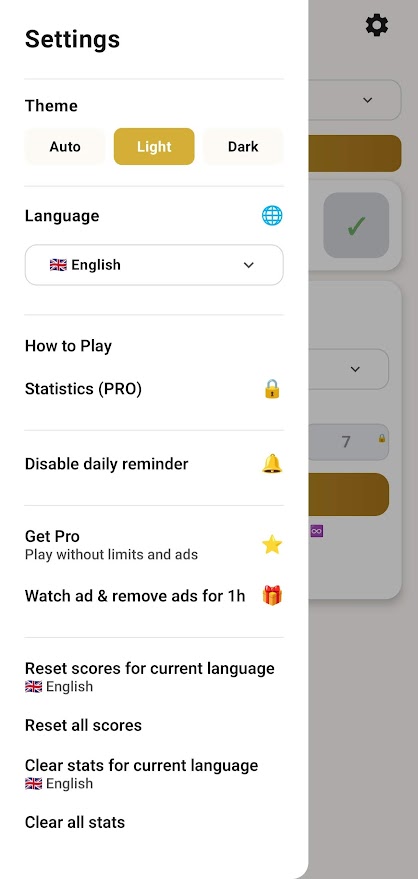
Full breakdown on our Guess The Word app page, or get it on Google Play.
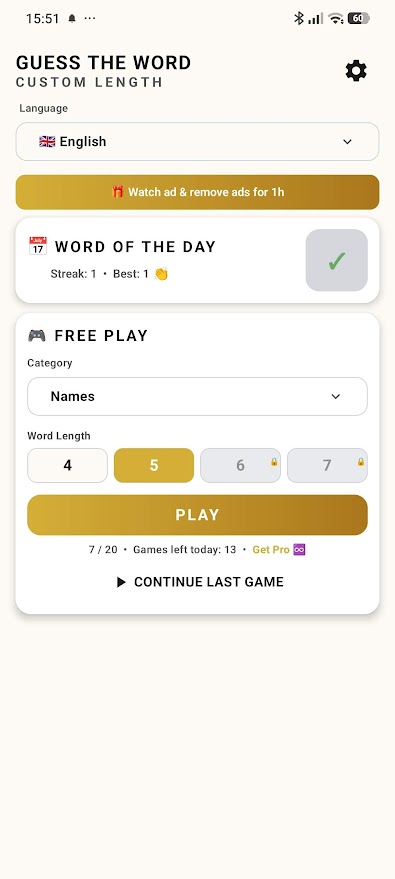
Want a Wordle-style game you can set up your way?
Get Guess The Word by MaslonLabs →2. NYT Games: Wordle & Crossword — Best for Daily Puzzles
The official home of Wordle on Android, and much more. The app is free to download and, according to its Google Play listing, offers new puzzles every day across Wordle, the Crossword, the Mini Crossword, Connections, Spelling Bee, Strands, Letter Boxed, Sudoku, Pips and Tiles. It has 10M+ downloads and a 4.8 rating from about 146,000 reviews.
- Best for: people who want the original Wordle plus a daily routine of several puzzle types.
- Stats and streaks: built-in stats, badges and friend leaderboards.
- Watch out for: the Play listing shows in-app purchases, and subscribers get extras such as an archive of more than 10,000 past puzzles. Some reviewers say more games are now behind the paywall.
3. Wordscapes — Best for Relaxed Word-Connect Play
Wordscapes by PeopleFun is a word-connect puzzle game: swipe letters to find hidden words that fill a crossword-style grid, over scenic backgrounds. It has 100M+ downloads and a 4.7 rating from about 1.4 million reviews. The listing says it offers over 6,000 crossword puzzles, is available in English, Spanish, German, French and Portuguese, and is tagged for offline play.
- Best for: a calm, no-timer game you can play a few levels at a time.
- Format: a mix of anagrams, word search and crossword.
- Watch out for: it contains ads and in-app purchases, and several recent reviews complain about ad frequency. A paid “Remove Ads” option exists in the in-game store.
4. Word Search Explorer — Best for Casual Word Search
Word Search Explorer by PlaySimple Games is a classic swipe-to-find word search with themed puzzles and travel-style progression. It has 100M+ downloads and a 4.9 rating from about 1.26 million reviews, is tagged for offline play, and was listed as the number one top free word game on Google Play when we checked.
- Best for: relaxed play with no typing and no time pressure.
- Helps you out: the game offers multiple hints.
- Watch out for: it contains ads and in-app purchases. Reviewers mention long ads and needing coins for hints.
Word Search Explorer on Google Play.
5. Words With Friends — Best for Playing Against Other People
Words With Friends by Zynga is the multiplayer word board game: build words on a board against friends or opponents found with Smart Match. Alongside the multiplayer mode it has a solo challenge against themed WordMasters and a Word Wheel anagram mode. It has 10M+ downloads and a 4.1 rating from about 526,000 reviews.
- Best for: social play and fans of Scrabble-style games.
- Extras: a Rewards Pass, clubs and leaderboards, and cosmetic stickers and tile styles.
- Watch out for: it contains ads and in-app purchases, and its 4.1 rating is the lowest of the five. Several recent reviews complain about ads between turns.
Words With Friends on Google Play.
Which Word Game Should You Download?
- You want the original Wordle and a daily routine: NYT Games.
- You want to relax with no pressure: Wordscapes or Word Search Explorer.
- You want to play against friends: Words With Friends.
- You like Wordle but want a different word length or a category: Guess The Word.
Looking specifically for Wordle-style games? See our guide to Wordle alternatives for Android, learn how to change the word length in Wordle, or practice with our 5-letter words list.
Frequently Asked Questions
What is the best free word game for Android?
Guess The Word: Custom Length by MaslonLabs is the best overall pick, because it lets you change the word length, category and language in one Wordle-style game. For other formats, NYT Games is the best for daily puzzles and the official Wordle, Wordscapes for relaxed word-connect play, Word Search Explorer for casual word search, and Words With Friends for multiplayer.
Which free word games work offline?
On Google Play, Wordscapes and Word Search Explorer are tagged for offline play. Daily games such as NYT Games and multiplayer games such as Words With Friends are built around online features, so check each listing for your needs.
Is Wordle available on Android?
Yes. The official Wordle is part of the NYT Games: Wordle & Crossword app on Google Play, which is free to download and has in-app purchases for subscribers.
Are there word games for Android with no ads?
Most free word games contain ads. Several offer a paid option to remove them, such as the Remove Ads pack in Wordscapes or Pro in Guess The Word, so check the in-app store before you commit.
What should I look for in a free word game?
Choose the format you enjoy first (daily puzzle, word connect, word search or multiplayer), then check the ads and purchases listed on Google Play, whether it works offline, and whether it gives you control over difficulty.
Is Guess The Word free?
Guess The Word is free to download and play with ads and in-app purchases. Pro unlocks all word lengths and removes ads.
Is Guess The Word the same as Wordle?
No. It uses the same green, yellow and gray feedback as Wordle, but you choose the word length (4 to 7 letters) and the category, and it supports 13 languages.