
The SEO landscape just shifted. For the past year, tracking how your content performs inside Google’s AI Overviews and AI Mode felt like navigating in the dark. SEO professionals and content creators were left guessing how much of their organic visibility was being absorbed by generative answers.
That blind spot is finally clearing up.
Google has officially rolled out dedicated Search Generative AI performance reports inside Google Search Console (GSC). Alongside this data drop, Google introduced a highly controversial feature: a direct toggle allowing publishers to block their content from AI responses completely.
Here is everything you need to know about tracking your AI performance, analyzing the new metrics, and making the strategic choice between AI visibility and data protection.
See what MaslonLabs has built for Android.
Explore our apps →The Breakthrough: Dedicated AI Performance Reports
Until now, data from AI-powered search features was bundled into your standard “Web” search type traffic, making it nearly impossible to isolate how AI features affected your impressions.
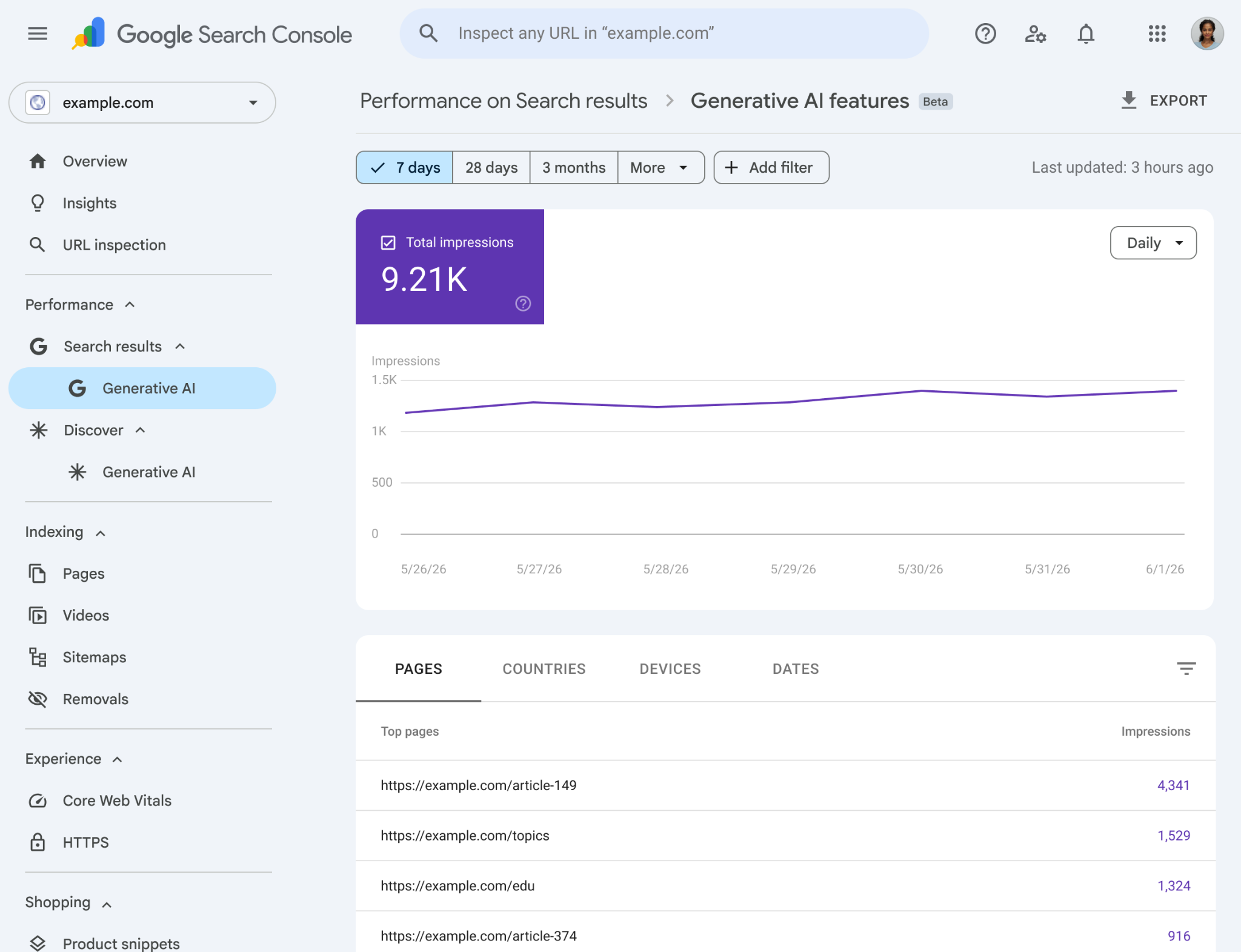
The new GSC updates introduce a dedicated reporting surface that separates AI search activity from traditional blue links. This report tracks visibility across AI Overviews, AI Mode, and generative AI elements inside Google Discover.
What Metrics Can You Actually Track?
Google’s new report provides deep visibility into five core dimensions:
- Impressions: How often URLs from your website appeared as supporting links or citations within generative AI features.
- Pages: A clear breakdown of which specific URLs are being picked up by Google’s LLM to ground its AI responses.
- Countries & Devices: Geographical and device-level (desktop vs. mobile) data for targeted insights.
⚠️ The Catch: For now, the report omits direct click data and query-level metrics specific to AI features. While your total clicks are still counted in the overall Web report, you cannot yet isolate exactly how many clicks a specific AI citation generated.
FAQ: Implementation, Availability, and Tool Integrations
When will the AI Performance Report be available?
Google has started rolling out the new Generative AI performance reports globally as of June 2026. Like most major Google Search Console updates, this is a phased rollout.
Initially, the reports are appearing for an initial subset of verified properties that already have a high volume of AI impressions. If you don’t see it in your sidebar yet, don’t panic—Google expects the interface to become universally available to all webmasters over the coming weeks.
How to enable the new AI reports and controls?
Good news: You do not need to add any new code to your website to enable the performance reports. Google automatically captures this data. Once the feature is rolled out to your account, a new tab or filter option labeled “Generative AI” will automatically appear under the Performance section in your GSC sidebar.
However, if you want to use the new AI Blocking Controls (the toggle to opt-out of AI responses), you will find this setting under the Settings > Associations / Crawling section of Search Console. By default, it is turned ON to ensure your site remains eligible for AI citations. Flipping it OFF will instantly block Google’s LLM from pulling your content into live AI Overviews.
Which LLM tools can be tracked within Google Search Console?
Google Search Console only tracks traffic and impressions generated within Google’s own ecosystem. Therefore, this report is strictly limited to Google’s LLM-powered search surfaces:
- AI Overviews (formerly SGE): The snapshots that appear at the very top of standard Google search results.
- AI Mode: The dedicated conversational search tab within Google.
- AI Overviews in Discover: Generative summaries appearing in the personalized Google Discover feed on mobile devices.
This means you cannot use GSC to track citations or referral traffic coming from independent LLM tools like OpenAI’s ChatGPT, Anthropic’s Claude, or Perplexity AI. To track those, you still have to rely on traditional referral traffic analysis in Google Analytics 4 (GA4).
Google GSC vs. Bing Webmaster Tools: How does it compare to tracking Bing Copilot?
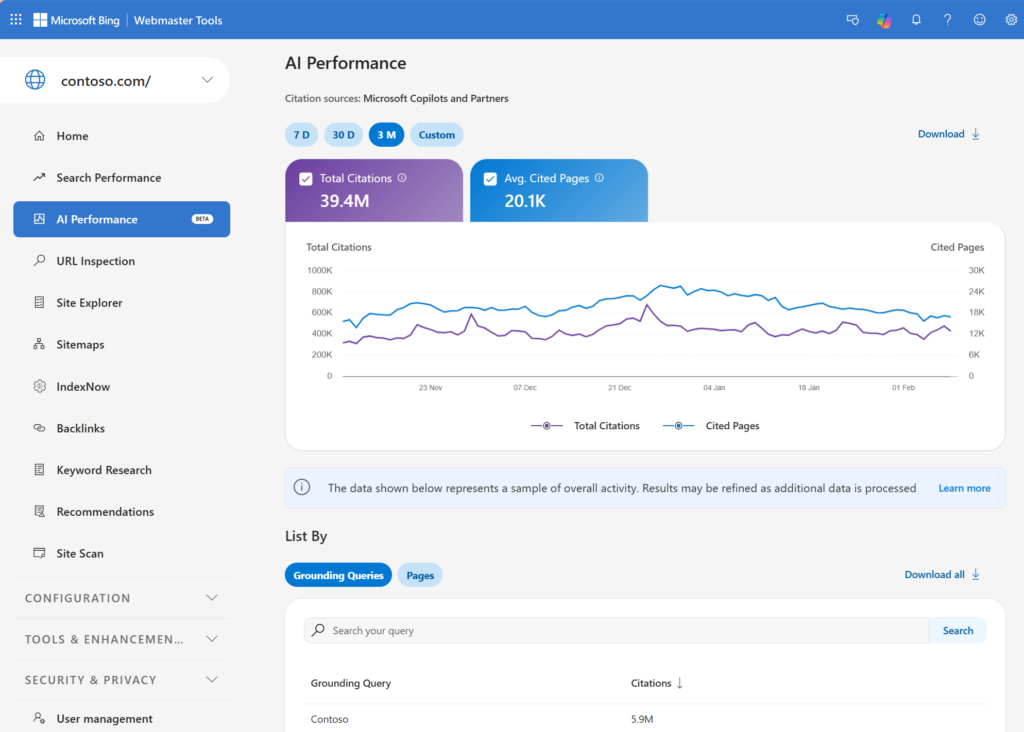
Microsoft was the first to market with AI search, and Bing Webmaster Tools has included “Bing Chat/Copilot” performance data for quite some time. Here is how Google’s new report stacks up against Microsoft’s implementation – and why Google’s version might frustrate heavy SEO data-analysts:
| Feature | Google Search Console (AI Report) | Bing Webmaster Tools (Copilot Report) |
| Data Separation | Fully isolated in a dedicated report surface. | Integrated into performance reports with specific bot/chat filters. |
| Click Tracking | ❌ No. Only counts impressions and pages crawled. | Yes. Tracks direct clicks from Copilot citations. |
| Query / Keyword Data (KWs) | ❌ No. Completely hidden due to user privacy boundaries. | Yes. Shows the exact search terms that triggered the AI response. |
| Granularity | Excellent (Hourly data available). | Standard (Daily/Weekly views). |
As you can see, the biggest differentiator right now is the complete absence of keywords (KWs) in Google Search Console. While Bing openly shows you the precise conversational queries that triggered your Copilot impressions, Google has chosen to completely hide query-level data.
This means that under Google’s new system, you can see which of your pages are being used to ground AI answers, but you won’t know what specific questions users asked to get there. To bridge this gap, SEOs will have to heavily rely on semantic keyword research and matching the content themes of their winning pages to predicted user intents.
Curious what we’ve built with these ideas?
Explore our Android apps by MaslonLabs →Step-by-Step: How to Adapt Your SEO Strategy
As these features roll out, here is how you should adapt your workflow:
- Isolate Your AI Footprint: Go to your new Performance tab and identify your “AI-friendly” pages. Google favors highly structured, authoritative content to ground its LLM responses. Double down on the formats that win impressions.
- Pair GSC with GA4: Because GSC doesn’t show isolated AI clicks yet, look for correlation. When your AI impressions spike in GSC, analyze your GA4 landing page traffic during that exact period to measure user behavior.
- Build a Cross-Platform GEO Strategy: Remember to optimize for how all AI agents search. Keep an eye on how your brand is cited across ChatGPT, Claude, and Perplexity alongside Google’s AI.
Final Thoughts: The Future of Optimization
The introduction of native AI reporting proves that Generative Search is here to stay. As a web developer, app creator, or SEO strategist, having access to this data allows you to transition from guessing to optimizing. Whether you choose to embrace Google’s AI ecosystem or shield your intellectual property using the new controls, you now have the data to back up your strategy.
Are you seeing the new AI Performance tab in your Search Console yet? Let us know in the comments how your impressions are holding up in the age of AI!
Stay tuned to the MaslonLabs Blog for more deep dives into Web Design, App Creation, SEO, and the practical implementation of LLMs.